
Can you show multiple photography genres in one portfolio?
You can show portraits, landscapes, wildlife, and other interests in the same portfolio. Clear gallery names, distinct covers, and a consistent presentation help visitors find the work they want to see without forcing you to choose a single genre.
Quick answer
Group photographs by the subject or project a viewer wants to see. Use separate galleries with clear names and representative covers. Keep one portfolio when the galleries share a useful audience or point of view; separate destinations need a clearer reason than genre alone.
In this guide
Group the work for your audience
Genre labels are useful when someone arrives to evaluate that capability. They are less useful when a project gains meaning from combining portraits, landscapes, details, and documents.
An editor looking for portraits will appreciate a gallery called Editorial Portraits. Someone exploring a town you photographed may prefer one project containing its people, streets, and small details.
Choose the grouping that follows the interest of the viewer. Place and subject galleries work well for travel and nature; project galleries can hold several genres together without making the visitor assemble the story.
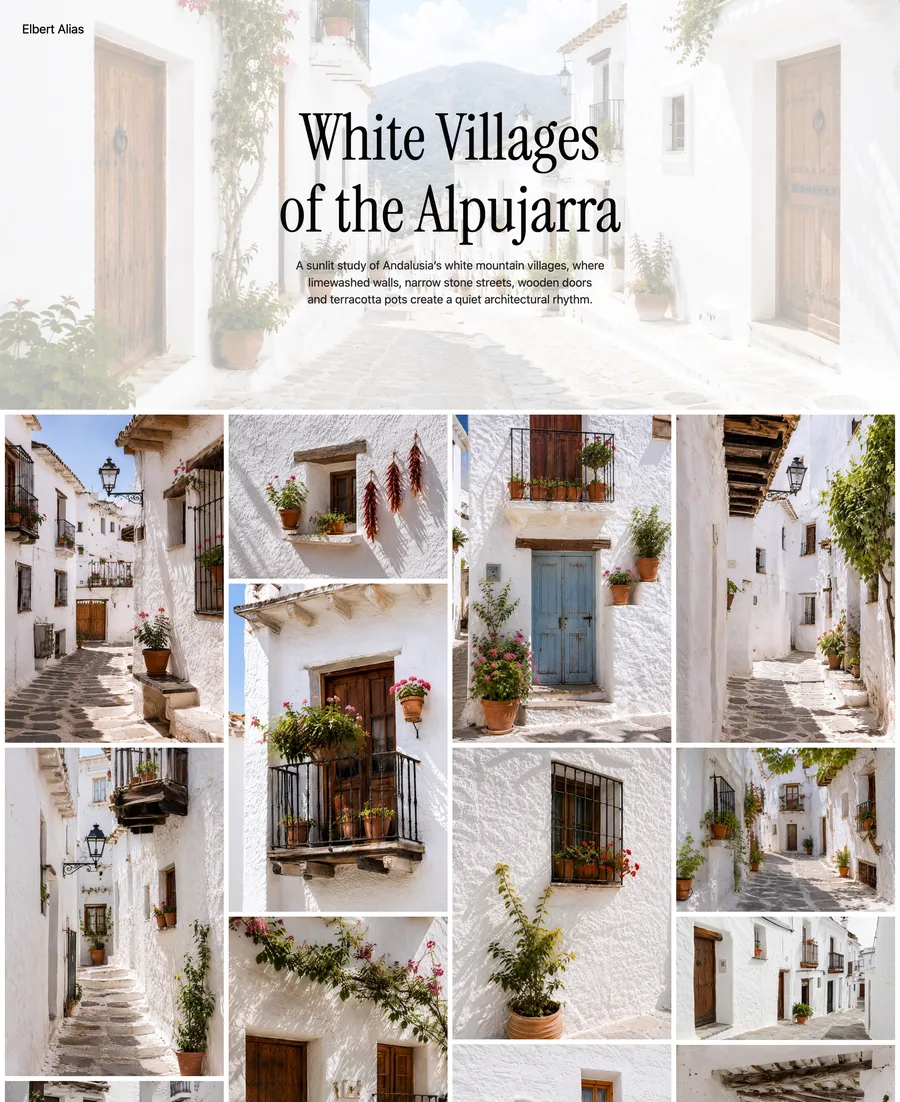
Give a trip or place its own gallery so the title and cover set a clear expectation.
Select the screenshot to view full size.
Give the opening selection a clear focus
A mixed homepage should demonstrate the common eye, not sample every category equally. Give it a curatorial rule.
You might open with a small current selection whose images connect visually, or let gallery covers introduce the different bodies of work. One developed project can also lead, with routes into the others below it.
Choose the approach that makes your strongest work easiest to enter. Giving every category equal space can make a tentative project compete with one that is already complete.
Three ways to organize the work
A concrete site map makes the decision easier. Start with the structure closest to the way viewers approach your work, then rename or remove galleries until every route has a distinct purpose.
- Personal practice: Home selection → Night Walks → Family Archive → Coast. The homepage demonstrates the common eye while each gallery preserves a complete body of work.
- Working photographer: Selected Work → Editorial Portraits → Events → Personal Projects. Capability galleries answer professional questions; personal work shows the broader point of view.
- Project-led hybrid: Current Project → Previous Projects → Commissions → About. Projects remain primary, while commissioned work has a direct route for viewers who need it.
- If two proposed galleries would use almost the same description, merge them. If one title needs "and" to hold unrelated work together, split it.
Decide what to separate
Separation helps when audiences need different evidence or when one body of work changes the meaning of another.
Family photographs or commissioned work may need different permissions and a smaller audience. A specific professional gallery may deserve a direct route for people who need that capability. Older work can stay out of the public selection if it no longer represents you.
Different subjects alone rarely require separate sites. Clear galleries can preserve the character of each series while keeping the whole portfolio manageable.
Order galleries by relationship
Lead with the work that best represents the whole practice or the audience you expect most often. Place related galleries next to each other and use the final gallery to expand the impression rather than repeat it.
A personal portfolio might move from one place or idea to the next, while a professional introduction can lead with the work most relevant to the viewer. For course projects, assignment order may be the clearest route.
Review the covers together as a small selection of photographs in their own right. Similar subjects can still feel distinct when the covers vary in scale and composition.
In ISO100, each gallery can have its own cover and description. Share a direct portrait-gallery link with someone interested in portraits, while keeping the rest of your photography a click away.
When to use separate portfolios
Use separate portfolios when the intended viewers, identity, permissions, or required actions are genuinely incompatible. One example is fine-art projects under your name alongside a separate high-volume event business. This means maintaining two edits, biographies, contact paths, and sets of links. If those do not need to differ, one portfolio with clear galleries is easier to maintain.
Give each body of work its own space.
Organize your photographs into ISO100 galleries with distinct covers and sequences, while keeping the presentation consistent across your portfolio.
Common questions
Can I include different photography styles in one portfolio?
Yes. Use distinct galleries and an opening selection that reveals the shared point of view. Variety is not a problem when viewers can understand why the work belongs together and reach the part relevant to them.
Should I organize my portfolio by genre or project?
Use genre when viewers need to evaluate a specific capability. Use projects when meaning comes from photographs of different kinds working together as one body of work.
Do I need separate websites for different photography genres?
Usually not. Separate sites are justified when the audiences, identity, permissions, or actions are incompatible. Otherwise, one portfolio with clear gallery boundaries is easier to maintain and share.
Choose the next topic.
Making your first portfolio
Work from a clear brief through image selection, galleries, and publication.
Portfolio essentials
Bring together galleries, context, and contact details in a clear website.
Portfolio examples
Explore seven ways to present projects, commissions, and a mixed practice.