
How should you sequence photos in a photography portfolio?
The order of your photographs affects how viewers understand the work. Choose an opening image, vary the pace, and check how adjacent photographs relate. This guide gives you a practical way to test and refine the sequence.
Quick answer
Choose an opener that establishes the subject, vary scale and pace through the middle, and end deliberately. Test adjacent photographs for relationships in light, color, gesture, or subject. Review the order again in the actual gallery layout.
In this guide
Decide how the series should unfold
Begin with the way you want someone to experience the series. Time, place, visual relationships, and emotion each suggest a different route through the same photographs.
A journey can follow the day from departure to arrival, while a study of one place might move from its open streets into more intimate spaces. Neither needs to follow the order in which you pressed the shutter.
You can also build a sequence around a color, a gesture, or a change in mood. Repeated framing can make small differences visible. Try one approach, then notice where a photograph asks for a different position.
Choose a strong opening
The first image should invite attention and accurately establish the world of the gallery. It does not have to explain the entire project or be the most spectacular frame.
A wide view can give someone their bearings; a direct portrait can introduce the person at the heart of the story. A less obvious opening can also work when you want the viewer to discover the subject gradually.
Look at the first photograph beside the gallery title and cover. Together they should prepare someone for the work that follows. A spectacular outlier can promise a very different gallery from the one you have made.
Show range in the first five images
The opening run often decides whether a viewer continues. It should establish the project without exhausting its best ideas.
After a wide opening, try a closer view that gives the place a human scale. A face, an object, or a small action can make the viewer curious about what comes next. By the third or fourth image, let another aspect of the project appear.
Save something for later. Placing all the dramatic frames at the beginning can leave the middle feeling like an afterthought. Two images made moments apart may be more useful at opposite ends of the sequence.
Connect neighboring photographs
A transition gives the viewer a reason to accept the next photograph. The connection can be clear or subtle, but it should feel intentional when the sequence is viewed as thumbnails.
Look for something that carries across the gap. A curve in one image might reappear in a hand; a small red accent might become the main color of the next frame. A person’s gaze can draw attention toward a neighboring photograph.
A break can be just as effective. Moving from a crowd to an empty room changes the pace, while a landscape followed by a close detail brings the viewer nearer. Keep the connections that deepen the series without making every pair feel like a visual puzzle.
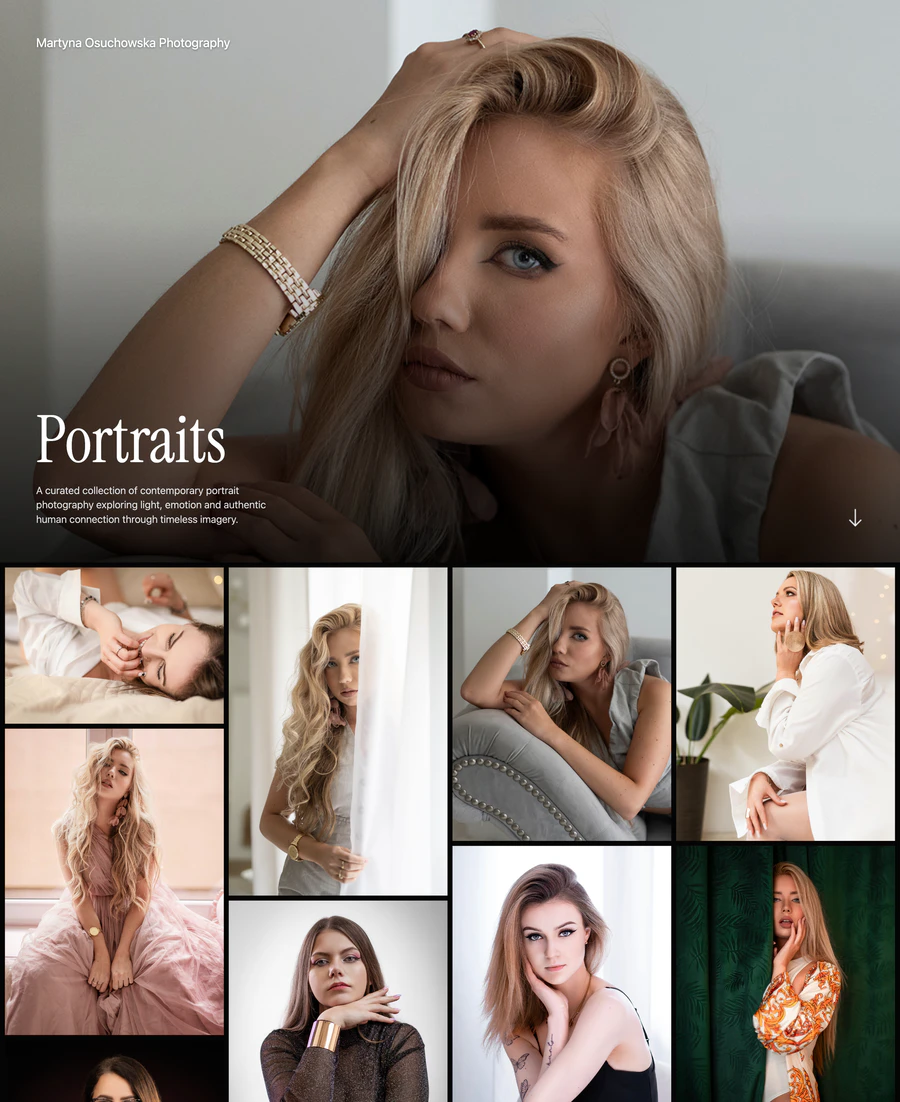
Read the visible sequence from left to right, then down the gallery.
Select the screenshot to view full size.
- Compare the first reclining portrait with the tighter upright portrait beside it. The subject remains consistent while the pose and framing change.
- The mix of tall and wide photographs affects which images sit beside each other. Check the sequence in the final layout.
We explore these relationships through the neighbor test in our guest article on editing and sequencing in Amateur Photographer.
Control rhythm in the middle
The middle is where good individual photographs often become repetitive. Use alternation and pauses to keep the viewer attentive.
After a dense or emotionally charged image, give a quieter photograph some room. It lets the previous frame linger and can make a small detail easier to notice. Similar compositions often become stronger when another image separates them.
Sometimes two or three photographs belong together because each changes the meaning of the others. Keep that group when the relationship is clear. If a frame repeats something already expressed more strongly, take it out and see whether the sequence moves more naturally.
Choose the ending deliberately
The final photograph can resolve the movement, echo the opener, reveal consequence, or leave a productive question. Test endings in groups of three because the approach changes their effect.
A closing image might return to the place where the series began, now changed by what the viewer has seen. It might move closer to a person or widen out to show the world around them. An unresolved image can leave room for thought without making the gallery feel unfinished.
Try the final three photographs in a different order. Often the ending itself is right, but the image just before it gives away too much or reaches the same feeling too soon.
Try the index-card exercise
Print small, inexpensive thumbnails or make a contact sheet and cut it into cards. Remove filenames. Arrange the sequence on a table, photograph each version, and build three alternatives: chronological, visual, and emotional. The physical distance makes patterns and duplication easier to see than advancing one full-screen image at a time.
Test the published rhythm
A contact-sheet sequence and a responsive webpage are not identical. Review the gallery on a phone and desktop. Image scale, scroll distance, grid placement, and mixed aspect ratios can change which photographs meet each other. Adjust the order when the public layout creates an accidental pair or long run.
In ISO100, use Reorder within the gallery to arrange thumbnails alongside a preview of your gallery layout. On a phone, switch between Arrange and Preview. Check desktop, tablet, and mobile widths: Flow changes the placement as the screen narrows, while row-based layouts carry the sequence across each row. Select Save order when you are ready, then preview individual photographs as well as the grid before publishing.
Publish the sequence you have in mind.
Arrange your photographs in ISO100, choose the opening image, and preview the gallery at phone and desktop sizes. Then share the finished series.
Common questions
Should I put my best photo first in a portfolio?
Put a strong and representative photo first. Your most dramatic image may be better later if it misrepresents the project or gives the sequence nowhere to develop.
Should a photography portfolio be chronological?
Use chronology when time or process is part of the meaning. Otherwise, thematic, visual, spatial, or emotional order may create a clearer experience.
How do I know when a photo sequence works?
A working sequence makes the subject and point of view clearer as it progresses, avoids accidental repetition, sustains attention through the middle, and ends in a way that feels chosen. Ask outside viewers where their attention dropped.
Choose the next topic.
Making your first portfolio
Work from a clear brief through image selection, galleries, and publication.
Choosing your photographs
Build a shortlist, remove weaker frames, and ask for useful feedback.
Finding the right image count
Use practical editing ranges to keep each gallery focused.