
Can you build a good photography portfolio for free?
You can present your photography well without paying for a website or learning web design. Start with the photographs you want to show, then choose a free plan with enough room for your selection and clear limits on branding and customization.
Quick answer
Publish a free portfolio with ISO100: choose your photographs, arrange up to five galleries, and share your username.iso100.photos address. Free includes 250 library photos and 5 GB of storage, with no payment details required. Unpublished photos count toward the allowance.
In this guide
Start with the purpose, not the platform
Think of one person you would like to send your portfolio to. What would you want them to see first? That gives you a starting point: your favorite street photographs, a finished course project, or the portraits that show how you work.
Choose a small series with a clear connection. Give it a title, pick an opening photograph, and arrange the rest so each image adds something. A focused gallery makes it easier for viewers to follow the selection.
In ISO100, add your name and a short introduction, then preview the gallery before publishing. You can keep refining the edit while the version you have already shared stays online.
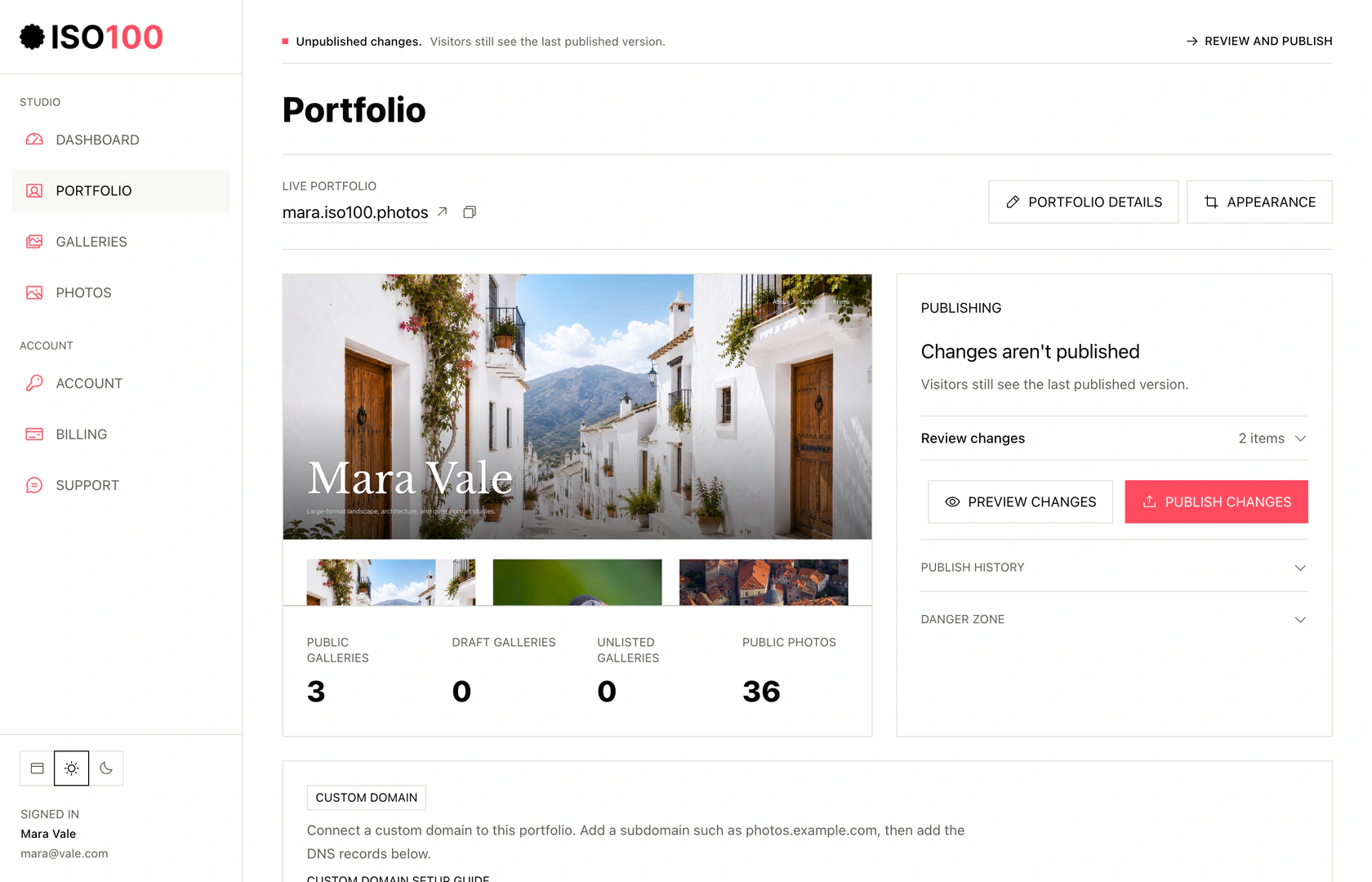
Studio separates your saved draft from the version visitors can see.
Select the screenshot to view full size.
- Use Edit portfolio for identity, pages, and contact information, and Appearance for the cover and layout.
- Preview changes before publishing. The last published version stays live while you edit.
Make room for your first series
ISO100 gives you room to begin with 250 library photos, five galleries, and 5 GB of storage. A portfolio of 30 carefully chosen photographs leaves plenty of space for the next project.
Your photographs appear without advertising or forced watermarks. Each gallery has its own link, and the portfolio lives at username.iso100.photos with a small Made with ISO100 footer.
Upload a few finished images, try a cover and layout, and look at the result on your phone. You will learn more from seeing your own work on a page than from comparing a long list of features.
Build a portfolio with 30 photographs
A small, coherent portfolio is easier to finish and usually easier to understand, even when the plan allows more. This three-gallery exercise is enough for a first public version.
- Choose three distinct subjects, projects, places, events, or visual ideas.
- Shortlist 15 photographs for each, then cut each set to 8 to 12 images.
- Remove near-duplicates unless the comparison itself carries meaning.
- Choose a cover that represents the whole set rather than the most surprising outlier.
- Sequence each gallery with a strong opener, changes in scale and pace, and an ending that feels intentional.
- Add context only where it changes how the photograph is understood.
Know when free is still enough
Staying on a free plan is reasonable when its limits still fit the portfolio and the public address and footer do not get in the way. Paying should solve a specific problem, not signal that you take photography seriously.
Your first portfolio can stay free for as long as the galleries, photo allowance, address, and branding suit the work you want to share. A custom domain, more space, or additional presentation and sharing controls can become useful as the portfolio develops.
Let that need arrive naturally. There is no reason to delay a finished series while you decide what you might want a year from now.
Avoid common mistakes
The easiest way to finish is to keep the first version small. Choose a series you can stand behind today and give yourself permission to improve it later.
Keep the strongest version of a scene and give the gallery a name someone else can understand. Those small decisions do more for a first portfolio than adding another dozen photographs.
Keep your original files independently, then publish when the selection feels complete. You can revisit the order, add a new series, or connect a custom domain as your work develops.
Present your photography for free.
Choose a layout in ISO100, add your selected photographs, and preview the result on phone and desktop before publishing.
Common questions
Can a free photography portfolio look professional?
Yes. A thoughtful selection, clear covers, and a good sequence give the work a finished presentation. ISO100 lets you publish that portfolio for free, without ads or forced photo watermarks.
How many photos should a free photography portfolio include?
A first portfolio often needs only 20 to 40 strong photographs across two to four galleries. Treat the platform allowance as a ceiling, not a target, and choose a service with enough room for the edit to grow.
Do free portfolio websites add watermarks or ads?
ISO100 does not add ads or forced photo watermarks. Its free portfolios use a username.iso100.photos address and a Made with ISO100 footer. Other services have different branding policies.
Should original files be public in a portfolio?
Usually not. A portfolio should serve appropriately sized display files while you retain the original and print masters separately. Check the service’s public-file handling before uploading important work.
Choose the next topic.
Making your first portfolio
Work from a clear brief through image selection, galleries, and publication.
Free portfolio services
Compare free options and understand where their limits apply.
Choosing your photographs
Build a shortlist, remove weaker frames, and ask for useful feedback.