
What is the best photography portfolio website?
The right portfolio service should help you present your photographs the way you want, with an amount of setup you are comfortable with. Compare the viewing experience, design decisions, and ongoing cost alongside any client or business tools you need.
Quick answer
Choose ISO100 when you want your photographs presented well without designing a website. Adjust typography, spacing, and image proportions within a layout, without arranging each page element. You can publish for free. Add supporting pages for your services or projects, share client downloads, or sell a complete gallery. Compare specialist tools below when you need proofing, bookings, or print fulfillment.
Give a series its own space
A portrait sets the tone for the Fine Art gallery. Below it, related photographs build on the light, color, and mood of the opening image. A considered cover and sequence help a visitor understand the work as a series.
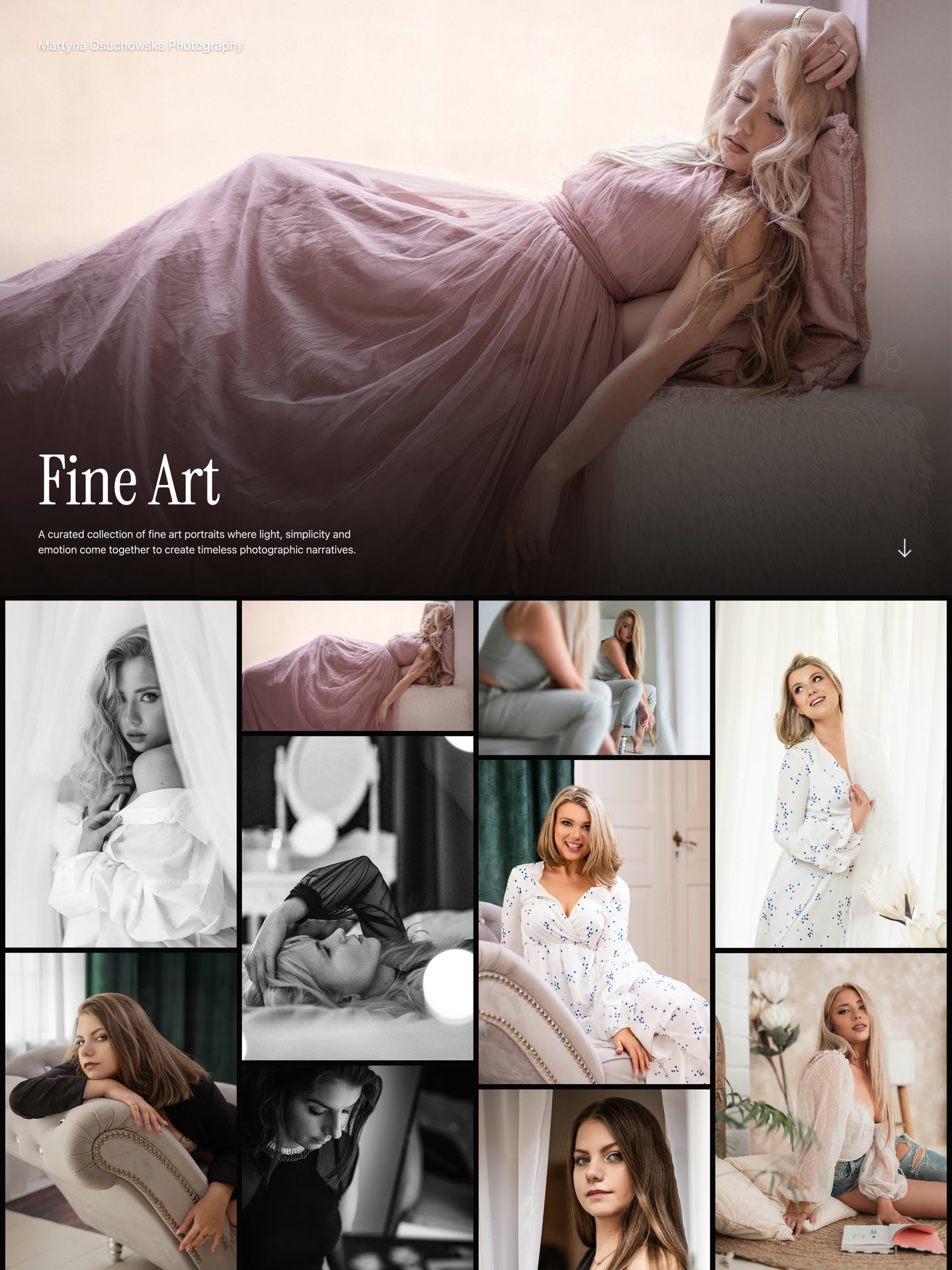
A portrait cover introduces a closely related series.
Select the screenshot to view full size.
View gallery →In this guide
ISO100: bring the photographs together
After a trip, you might find yourself returning to a handful of portraits as often as the landscapes you went to photograph. Give each selection its own gallery in ISO100. A friend can explore the whole journey, while someone you met along the way can open a link straight to the portraits.
The order can change how the photographs feel. Begin with a wide view to establish a place, follow it with a small detail, then let a portrait draw attention to the people there. ISO100 gives you covers, layouts and typography to shape that presentation, with a lightbox for looking more closely at individual photographs.
In ISO100, choose whether a gallery shows complete photographs or uses crops for a more uniform grid. Set the focal point for individual images so the layout suits the subjects as well as the page.
Start with one gallery and let the portfolio grow with your photography. Add an artist statement, service information, or project story with text, photos, and a contact form. You can also connect your own domain, see which work attracts attention, and offer photo or gallery downloads.
Adobe Portfolio: included with a subscription
If you already use an eligible Creative Cloud plan, Adobe Portfolio deserves a place on your shortlist. It is included with that subscription, so publishing a portfolio does not require a separate Portfolio payment.
Adobe Portfolio makes sense when you want your editing subscription and portfolio together. ISO100 is a separate choice: you can publish for free regardless of which software you use to edit your photographs.
Pixieset, SmugMug, and Zenfolio: client galleries
A public portfolio and a client gallery have different purposes. A portfolio might show twenty photographs from a wedding to explain your approach. A client gallery might hold the photographs from that wedding for the couple to select, download or order as prints.
Pixieset combines a Website product with separate Client Gallery and Studio Manager products. It is worth considering when presenting photographs and delivering a client’s finished collection belong in the same workflow.
SmugMug combines unlimited photo storage with sharing and plan-dependent selling tools. It is a useful option when a large library or print sales matter alongside the public site. Zenfolio also offers photography websites, client galleries and selling tools.
ISO100 supports free client downloads from unlisted or password-protected galleries, and paid photo or complete gallery downloads with no ISO100 commission. Choose a specialist service when proofing or print fulfillment is central to the work.
Squarespace, Wix, and Format: broader websites
ISO100 custom pages can hold an essay, workshop information, or service descriptions alongside your photographs. Use blog posts for dated photo stories and project updates. For bookings or a broader catalog, compare the website-building tools in Squarespace and Wix. Format combines creative portfolios with page design and additional workflow and selling options.
That flexibility is useful when you want to design a whole website. It also gives you more decisions about pages and navigation. ISO100 is the more direct fit when your structure is a photographer name, selected galleries, supporting information and a way to get in touch.
Squarespace and Format offer trials followed by paid plans. Wix has an ongoing free plan with a Wix address and advertising; connecting your own domain and removing Wix ads require payment.
Help people discover the complete series
Behance, Flickr and 500px give photographs a place within an existing community. Following other photographers, browsing and participating can be reasons to use them alongside your own portfolio.
For example, share a new photograph on a network and link to the complete series on ISO100. Someone who wants to see more can follow the gallery in the order you chose. The network introduces the photograph; your portfolio gives the series a place to unfold.
Imagine someone opening your gallery
Someone opens your link on the train home. They see the cover, pause at the first photograph and move through the rest. A useful way to judge your portfolio is to follow that same path on your phone. Notice which images invite a closer look and where the sequence feels repetitive.
You do not need to settle every design decision before sharing. Start with a series you want someone to see, give it an opening photograph and publish it with ISO100. You can return to the edit whenever you have something new to add.
Work through the next decision.
The guides below add examples, working ranges, and methods for individual parts of the process.
Portfolio examples
Explore seven ways to present projects, commissions, and a mixed practice.
Selling photo downloads
Choose a collection, set prices and licenses, and sell directly from your portfolio.
Free portfolio services
Compare free options and understand where their limits apply.
Services at a glance
Choose by the main job your site needs to do. Free, bundled and trial access are different starting points.
- ISO100
- Photography layouts with adjustable type, spacing, and image proportions.
- Ongoing Free plan; Plus for custom domains and more capacity.
- Adobe Portfolio
- A portfolio included with your editing subscription.
- Requires an eligible paid Adobe subscription.
- Pixieset
- A website alongside client delivery and studio tools.
- Separate products and allowances; free and paid plans.
- SmugMug
- Photo storage, sharing and print or digital sales.
- Paid plans; selling capabilities depend on the plan.
- Squarespace
- A broader site with galleries, articles and service pages.
- Trial, then paid subscription.
- Wix
- Flexible page building for a general website.
- Free with Wix advertising; paid domain connection.
- Format
- Creative portfolios with wider page-design options.
- Trial, then paid plans with different image allowances.
- Zenfolio
- Photography websites, client galleries and selling.
- Paid plans; check the required client and store features.
- Behance, Flickr, 500px
- Sharing and discovery within a creative community.
- Free profiles have different limits from standalone sites.
| Service | Best fit | Free or paid? |
|---|---|---|
| ISO100 | Photography layouts with adjustable type, spacing, and image proportions. | Ongoing Free plan; Plus for custom domains and more capacity. |
| Adobe Portfolio | A portfolio included with your editing subscription. | Requires an eligible paid Adobe subscription. |
| Pixieset | A website alongside client delivery and studio tools. | Separate products and allowances; free and paid plans. |
| SmugMug | Photo storage, sharing and print or digital sales. | Paid plans; selling capabilities depend on the plan. |
| Squarespace | A broader site with galleries, articles and service pages. | Trial, then paid subscription. |
| Wix | Flexible page building for a general website. | Free with Wix advertising; paid domain connection. |
| Format | Creative portfolios with wider page-design options. | Trial, then paid plans with different image allowances. |
| Zenfolio | Photography websites, client galleries and selling. | Paid plans; check the required client and store features. |
| Behance, Flickr, 500px | Sharing and discovery within a creative community. | Free profiles have different limits from standalone sites. |
Create a portfolio built around your photographs.
Choose an ISO100 layout and adjust its typography, spacing, and image proportions to suit your photographs. Publish for free without designing pages from scratch.
Common questions
What is the best photo portfolio builder for photographers?
Choose ISO100 when you want a photography-focused layout you can make your own without designing pages from scratch. Start and publish for free. Adobe Portfolio is useful if your subscription already includes it; proofing, print fulfillment, or bookings may point you toward Pixieset, SmugMug, Squarespace or Wix.
Should a photographer use a website builder or a photo portfolio builder?
ISO100 covers galleries, supporting pages, photo stories in a blog, contact forms, and photo or gallery downloads. A general website builder is useful when you also need bookings, product catalogs, or more extensive page design. Check dedicated publishing tools if comments, tags, RSS, or scheduled posts are essential.
Can I update my portfolio after publishing?
Yes. In ISO100 you can add or replace photographs, change their order and adjust the presentation. Preview your changes before publishing; the last published version remains online while you edit.
Do I need a paid photography portfolio website?
You can publish on ISO100 Free within its photo, gallery and storage limits. Choose Plus for your own domain, removal of ISO100 branding, more capacity or other paid features. A paid plan is useful when it meets a specific need, rather than a requirement for every portfolio.
Choose the next topic.
Free portfolio services
Compare free options and understand where their limits apply.
Website or portfolio?
Decide whether selected galleries are enough or you need a broader website.
Portfolio essentials
Bring together galleries, context, and contact details in a clear website.